If you're on Claude (or thinking about it), this one's for you.
I don't write code.
I do normal everyday work: writing, planning, brainstorming.
But I do most of my Claude work in Claude Code.
Why? Well, it's the same Claude, but it has some really nifty capabilities.
Maybe they designed them for coders, but they work really well for a non-coder like me. And I think that they will be useful for you too.
One: context window (/context)
When I type /context, it shows me my context window and a breakdown of where I've spent it.

My context window is one million tokens.
Yours might be different, depending on your plan.
The breakdown shows what’s using my context window in this chat: messages, then system tools, MCP tools, memory files, system prompts, skills and more.
It’s interesting to start a new chat and have a look at the context window straight away.
Before I did anything, 73K of my one million tokens were already used by system tools, MCP tools and memory files.
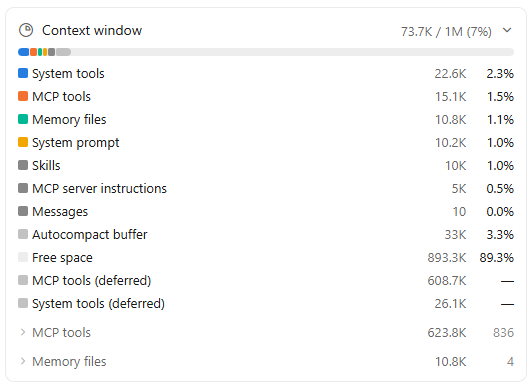
I could see, for example, that it loaded quite a lot of MCP tools I probably don’t need for this chat.
So I can go to my settings and control which tools load automatically.
All of these fill up my context window.
And when the context window fills, the AI gets a bit confused and forgetful.
Claude will auto-compact the conversation and forget some details.
So it’s best to work in the happy zone, before it fills up.
A chat looks healthy when most of the usage comes from my messages, the files I upload and the things we read together.
I sat down with Claude once to analyse my usage across chats. We found that I had a lot of context loaded into every chat that I never needed.
So I optimised that, and my Claude became so much smarter.
Two: fork
Fork duplicates the chat from the moment where we are.
Over the weekend I worked on policy and governance for AI, for two reasons:
a chapter for my new book, coming early in 2027
the policy kit I give our club members.
The context for both of them is the same.
So I started the chat by getting Claude to read a lot of material: my policy guide, transcripts from policy sessions I’ve run, and transcripts from conversations I had with interesting people about policy and governance.
At that point, my one million token context window was already a third full.
So how was I going to get through the whole thing?
I did two forks: one for the policy kit and one for chapter 10 of my book.
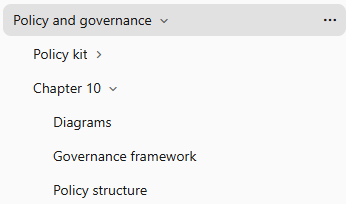
Then I continued each one separately.
I also fork when I want to go on a tangent that will use a lot of tokens, and then come back.
I was working on the chapter and wanted some diagrams.
So I forked again and used that chat to work on the diagrams.
When we finished, I brought the diagrams back into the original chat. No context wasted.
The other time I use fork is when a chat goes in the wrong direction.
Deep into a chat, I think, “Oh, that’s not where I wanted to go.”
I scroll up in my conversation, find the exact spot where I wish I’d said something else, and fork from there.
Then I continue in the direction I really want.
So I fork when I want to:
use the same context for different chat directions
go on a tangent and come back
go back to where a chat got messy and continue again from there
Three: by the way (/btw)
While Claude is working, we can keep sending it messages, and they queue up.
In the video, you see me doing that while Claude is busy researching AI news on Copilot and Claude. I type: “Also consider ChatGPT.” Some time later, Claude picks it up and uses it to inform its work.
But if I really need to ask Claude something now, I use the “by the way” command, /btw.

It starts a little chat on the side.
In the video, I asked, “Which sources have you used so far?”
It answers right away, it knows what’s going on in the original chat, and it doesn’t change what that original chat is doing.
It’s a way to tap Claude on the shoulder while it’s working. How are you doing? What are you working on? Did you manage to look at that one?
Give it a go
Most people I see have never touched Claude Code, because it sounds like it’s for coding.
But it’s not. So many people use it as their default, like me.
If you try it and it feels like it doesn’t know you as well as your other Claude does, it’s missing context.
Give it access to the same files, the same connectors and the same instructions it loads when it starts.
That’s it. Then it should feel like it’s (almost) the same one.
Give it a go,
--
Inbal Rodnay
Guiding Firms in AI Adoption and Automation
Keynote speaker | AI Workshops | Executive briefings | The Tech Savvy Firm